Vehicle Plate Recognition
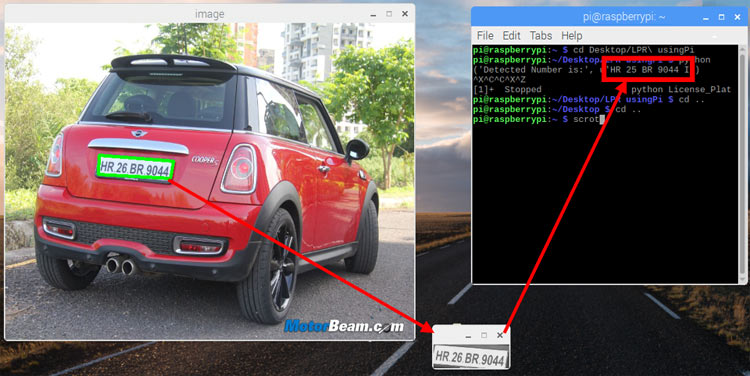
Automatic Number Plate Recognition (ANPR) API for IoT and embedded systems. Upload an image and get the vehicle plate number instantly.
100 scans/monthView Docs
Get Started in Minutes
Start sending IoT notifications in just a few simple steps
1
Create Account
Sign up for free, no credit card required
2
Get API Key
Generate your API key from dashboard
3
Capture Image
Take a photo of the vehicle plate
4
Get Plate Number
API returns detected plate text
Try API
Test the Vehicle Plate Recognition directly from your browser
API Key:
cd_xxxxxxxxxxxxxxxxxxxxVehicle Image
Upload Vehicle Image
Upload a clear photo of the vehicle.
Click or drag & drop
JPG, PNG up to 5MB
Result
No result yet
Upload an image and run the test to see the annotated output
1/*
2 * ESP32-CAM Vehicle Number Plate Recognition
3 *
4 * Overview:
5 * This project uses the ESP32-CAM to capture an image of a vehicle's number plate
6 * and sends it to the Circuit Digest cloud server for recognition. The server
7 * processes the image using machine learning models and returns the recognized
8 * number plate data. The result is displayed on an OLED screen connected to the ESP32-CAM.
9 *
10 * Features:
11 * - Captures an image using the ESP32-CAM.
12 * - Sends the captured image to a cloud server via a secure HTTPS connection.
13 * - Receives and displays the recognized number plate data.
14 * - Uses an OLED display to show status messages and results.
15 * - Supports any device with a camera and internet access using the API.
16 *
17 * Components Required:
18 * - ESP32-CAM Module
19 * - OLED Display (SSD1306)
20 * - Push Button (Trigger button)
21 * - Flashlight (LED)
22 *
23 * Note:
24 * Ensure that the ESP32-CAM is correctly wired, including the I2C pins for the OLED display.
25 */
26
27#include <Arduino.h>
28#include <WiFi.h>
29#include <WiFiClientSecure.h>
30#include "soc/soc.h"
31#include "soc/rtc_cntl_reg.h"
32#include "esp_camera.h"
33
34/* I2C and OLED Display Includes ------------------------------------------- */
35#include <Wire.h>
36#include <Adafruit_GFX.h>
37#include <Adafruit_SSD1306.h>
38
39// ESP32-CAM doesn't have dedicated I2C pins, so we define our own
40#define I2C_SDA 15
41#define I2C_SCL 14
42TwoWire I2Cbus = TwoWire(0);
43
44// Display defines
45#define SCREEN_WIDTH 128
46#define SCREEN_HEIGHT 64
47#define OLED_RESET -1
48#define SCREEN_ADDRESS 0x3C
49Adafruit_SSD1306 display(SCREEN_WIDTH, SCREEN_HEIGHT, &I2Cbus, OLED_RESET);
50
51const char* ssid = "YOUR_WIFI_SSID";       // Replace with your WiFi SSID
52const char* password = "YOUR_WIFI_PASSWORD"; // Replace with your WiFi Password
53String serverName = "www.circuitdigest.cloud";
54String serverPath = "/api/v1/readnumberplate";
55const int serverPort = 443;
56String apiKey = "YOUR_API_KEY";            // Replace with your API key
57
58#define triggerButton 13  // GPIO pin for the trigger button
59#define flashLight 4      // GPIO pin for the flashlight
60int count = 0;
61
62WiFiClientSecure client;
63
64// Camera GPIO pins
65#define PWDN_GPIO_NUM 32
66#define RESET_GPIO_NUM -1
67#define XCLK_GPIO_NUM 0
68#define SIOD_GPIO_NUM 26
69#define SIOC_GPIO_NUM 27
70#define Y9_GPIO_NUM 35
71#define Y8_GPIO_NUM 34
72#define Y7_GPIO_NUM 39
73#define Y6_GPIO_NUM 36
74#define Y5_GPIO_NUM 21
75#define Y4_GPIO_NUM 19
76#define Y3_GPIO_NUM 18
77#define Y2_GPIO_NUM 5
78#define VSYNC_GPIO_NUM 25
79#define HREF_GPIO_NUM 23
80#define PCLK_GPIO_NUM 22
81
82// Function to extract a JSON string value by key
83String extractJsonStringValue(const String& jsonString, const String& key) {
84  int keyIndex = jsonString.indexOf(key);
85  if (keyIndex == -1) return "";
86  int startIndex = jsonString.indexOf(':', keyIndex) + 2;
87  int endIndex = jsonString.indexOf('"', startIndex);
88  if (startIndex == -1 || endIndex == -1) return "";
89  return jsonString.substring(startIndex, endIndex);
90}
91
92// Function to display text on OLED
93void displayText(String text) {
94  display.clearDisplay();
95  display.setCursor(0, 10);
96  display.setTextSize(1);
97  display.setTextColor(SSD1306_WHITE);
98  display.print(text);
99  display.display();
100}
101
102void setup() {
103  WRITE_PERI_REG(RTC_CNTL_BROWN_OUT_REG, 0);
104  Serial.begin(115200);
105  pinMode(flashLight, OUTPUT);
106  pinMode(triggerButton, INPUT);
107  digitalWrite(flashLight, LOW);
108
109  WiFi.mode(WIFI_STA);
110  Serial.println();
111  Serial.print("Connecting to ");
112  Serial.println(ssid);
113  WiFi.begin(ssid, password);
114  while (WiFi.status() != WL_CONNECTED) {
115    Serial.print(".");
116    delay(500);
117  }
118  Serial.println();
119  Serial.print("ESP32-CAM IP Address: ");
120  Serial.println(WiFi.localIP());
121
122  camera_config_t config;
123  config.ledc_channel = LEDC_CHANNEL_0;
124  config.ledc_timer = LEDC_TIMER_0;
125  config.pin_d0 = Y2_GPIO_NUM;
126  config.pin_d1 = Y3_GPIO_NUM;
127  config.pin_d2 = Y4_GPIO_NUM;
128  config.pin_d3 = Y5_GPIO_NUM;
129  config.pin_d4 = Y6_GPIO_NUM;
130  config.pin_d5 = Y7_GPIO_NUM;
131  config.pin_d6 = Y8_GPIO_NUM;
132  config.pin_d7 = Y9_GPIO_NUM;
133  config.pin_xclk = XCLK_GPIO_NUM;
134  config.pin_pclk = PCLK_GPIO_NUM;
135  config.pin_vsync = VSYNC_GPIO_NUM;
136  config.pin_href = HREF_GPIO_NUM;
137  config.pin_sscb_sda = SIOD_GPIO_NUM;
138  config.pin_sscb_scl = SIOC_GPIO_NUM;
139  config.pin_pwdn = PWDN_GPIO_NUM;
140  config.pin_reset = RESET_GPIO_NUM;
141  config.xclk_freq_hz = 20000000;
142  config.pixel_format = PIXFORMAT_JPEG;
143
144  if (psramFound()) {
145    config.frame_size = FRAMESIZE_SVGA;
146    config.jpeg_quality = 5;
147    config.fb_count = 2;
148    Serial.println("PSRAM found");
149  } else {
150    config.frame_size = FRAMESIZE_CIF;
151    config.jpeg_quality = 12;
152    config.fb_count = 1;
153  }
154
155  esp_err_t err = esp_camera_init(&config);
156  if (err != ESP_OK) {
157    Serial.printf("Camera init failed with error 0x%x", err);
158    delay(1000);
159    ESP.restart();
160  }
161
162  I2Cbus.begin(I2C_SDA, I2C_SCL, 100000);
163
164  if (!display.begin(SSD1306_SWITCHCAPVCC, SCREEN_ADDRESS)) {
165    Serial.printf("SSD1306 OLED display failed to initialize.\nCheck that display SDA is connected to pin %d and SCL connected to pin %d\n", I2C_SDA, I2C_SCL);
166    while (true);
167  }
168
169  displayText("System Initialization Successful");
170  delay(1000);
171  displayText("Press Trigger Button \n\nto Start Capturing");
172}
173
174void loop() {
175  if (digitalRead(triggerButton) == HIGH) {
176    int status = sendPhoto();
177    if (status == -1) {
178      displayText("Image Capture Failed");
179    } else if (status == -2) {
180      displayText("Server Connection Failed");
181    }
182  }
183}
184
185// Function to capture and send photo to the server
186int sendPhoto() {
187  camera_fb_t* fb = NULL;
188
189  delay(100);
190  fb = esp_camera_fb_get();
191  delay(100);
192
193  if (!fb) {
194    Serial.println("Camera capture failed");
195    return -1;
196  }
197
198  displayText("Image Capture Success");
199  delay(300);
200
201  Serial.println("Connecting to server:" + serverName);
202  displayText("Connecting to server:\n\n" + serverName);
203  client.setInsecure();
204
205  if (client.connect(serverName.c_str(), serverPort)) {
206    Serial.println("Connection successful!");
207    displayText("Connection successful!");
208    delay(300);
209    displayText("Data Uploading !");
210
211    count++;
212    String filename = apiKey + ".jpeg";
213
214    String head = "--CircuitDigest\r\nContent-Disposition: form-data; name=\"imageFile\"; filename=\"" + filename + "\"\r\nContent-Type: image/jpeg\r\n\r\n";
215    String tail = "\r\n--CircuitDigest--\r\n";
216    uint32_t imageLen = fb->len;
217    uint32_t extraLen = head.length() + tail.length();
218    uint32_t totalLen = imageLen + extraLen;
219
220    client.println("POST " + serverPath + " HTTP/1.1");
221    client.println("Host: " + serverName);
222    client.println("Content-Length: " + String(totalLen));
223    client.println("Content-Type: multipart/form-data; boundary=CircuitDigest");
224    client.println("Authorization:" + apiKey);
225    client.println();
226    client.print(head);
227
228    uint8_t* fbBuf = fb->buf;
229    size_t fbLen = fb->len;
230    for (size_t n = 0; n < fbLen; n += 1024) {
231      if (n + 1024 < fbLen) {
232        client.write(fbBuf, 1024);
233        fbBuf += 1024;
234      } else {
235        size_t remainder = fbLen % 1024;
236        client.write(fbBuf, remainder);
237      }
238    }
239
240    client.print(tail);
241    esp_camera_fb_return(fb);
242    displayText("Waiting For Response!");
243
244    String response;
245    long startTime = millis();
246    while (client.connected() && millis() - startTime < 5000) {
247      if (client.available()) {
248        char c = client.read();
249        response += c;
250      }
251    }
252
253    String NPRData = extractJsonStringValue(response, "\"number_plate\"");
254    Serial.print("Response: ");
255    Serial.println(response);
256    displayText("NPR Data:\n\n" + NPRData);
257
258    client.stop();
259    esp_camera_fb_return(fb);
260    return 0;
261  } else {
262    Serial.println("Connection to server failed");
263    esp_camera_fb_return(fb);
264    return -2;
265  }
266}
Tutorials
Learn how to integrate with step-by-step guides